|
|
马上注册,获取更多创业资源,认识更多朋友!
您需要 登录 才可以下载或查看,没有帐号?立即注册
x
仿这个图片用html写的代码

实际效果:
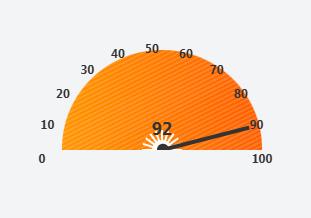
- <!DOCTYPE html>
- <html lang="zh-CN">
- <head>
- <meta charset="UTF-8">
- <meta name="viewport" content="width=device-width, initial-scale=1.0">
- <title>带外围数字的随机仪表盘</title>
- <style>
- /* 仪表盘整体容器(包含数值显示) */
- .dashboard-wrapper {
- position: relative;
- width: 220px; /* 加宽适配外围数字 */
- height: 120px;
- margin: 50px auto;
- text-align: center;
- }
- /* 仪表盘容器 */
- .dashboard {
- position: relative;
- width: 200px;
- height: 100px;
- margin: 0 auto;
- border-radius: 100px 100px 0 0;
- background: linear-gradient(to right, #ff9500 0%, #ff5e00 100%);
- overflow: hidden;
- }
- /* 刻度背景纹理 */
- .dashboard::before {
- content: '';
- position: absolute;
- top: 0;
- left: 0;
- width: 100%;
- height: 100%;
- background:
- repeating-linear-gradient(
- to bottom right,
- transparent 0px,
- transparent 2px,
- rgba(255, 255, 255, 0.15) 2px,
- rgba(255, 255, 255, 0.15) 4px
- );
- border-radius: 100px 100px 0 0;
- pointer-events: none;
- }
- /* 刻度线容器 */
- .scale-container {
- position: absolute;
- bottom: 0;
- left: 0;
- width: 100%;
- height: 100%;
- border-radius: 100px 100px 0 0;
- pointer-events: none;
- }
- /* 主刻度线(长刻度) */
- .major-scale {
- position: absolute;
- bottom: 0;
- left: 50%;
- width: 2px;
- height: 20px;
- background: #fff;
- transform-origin: bottom center;
- }
- /* 副刻度线(短刻度) */
- .minor-scale {
- position: absolute;
- bottom: 0;
- left: 50%;
- width: 1px;
- height: 10px;
- background: rgba(255, 255, 255, 0.8);
- transform-origin: bottom center;
- }
- /* 数字标记(调整到外围) */
- .scale-number {
- position: absolute;
- color: #333; /* 改深色更清晰 */
- font-size: 12px;
- font-weight: bold;
- transform: translateX(-50%);
- /* 禁止文字选中 */
- user-select: none;
- }
- /* 指针样式 */
- .needle {
- position: absolute;
- bottom: 0;
- left: 50%;
- width: 4px;
- height: 90px;
- background: #333;
- transform-origin: bottom center;
- transform: translateX(-50%) rotate(-90deg);
- transition: transform 0.8s ease; /* 放慢动画更自然 */
- z-index: 10;
- }
- /* 指针头部小圆点 */
- .needle::after {
- content: '';
- position: absolute;
- bottom: -5px;
- left: 50%;
- width: 12px;
- height: 12px;
- background: #333;
- border-radius: 50%;
- transform: translateX(-50%);
- }
- /* 当前数值显示 */
- .current-value {
- position: absolute;
- bottom: 10px;
- left: 50%;
- transform: translateX(-50%);
- font-size: 18px;
- font-weight: bold;
- color: #333;
- z-index: 15;
- }
- </style>
- </head>
- <body>
- <!-- 仪表盘整体容器 -->
- <div class="dashboard-wrapper">
- <!-- 仪表盘主体 -->
- <div class="dashboard">
- <!-- 刻度线容器 -->
- <div class="scale-container" id="scaleContainer"></div>
- <!-- 指针 -->
- <div class="needle" id="needle"></div>
- <!-- 当前数值显示 -->
- <div class="current-value" id="currentValue">0</div>
- </div>
- </div>
- <script>
- // 获取核心元素
- const needle = document.getElementById('needle');
- const scaleContainer = document.getElementById('scaleContainer');
- const currentValue = document.getElementById('currentValue');
-
- // 初始化刻度和外围数字
- function initScale() {
- // 生成刻度:0-100,每10个单位一个主刻度(带数字),每2个单位一个副刻度
- for (let value = 0; value <= 100; value += 2) {
- // 计算刻度旋转角度(和指针角度逻辑一致)
- const angle = (value / 100) * 180 - 90;
-
- // 主刻度(每10个单位)
- if (value % 10 === 0) {
- // 创建主刻度线
- const majorScale = document.createElement('div');
- majorScale.className = 'major-scale';
- majorScale.style.transform = `translateX(-50%) rotate(${angle}deg)`;
- scaleContainer.appendChild(majorScale);
- // 计算外围数字位置(半径加大,移到仪表盘外)
- const radius = 110; // 大于仪表盘半径(100),显示在外部
- const rad = angle * Math.PI / 180;
- // 基于仪表盘中心(100,100)计算外围坐标
- const x = 100 + radius * Math.sin(rad);
- const y = 100 - radius * Math.cos(rad);
- // 创建外围数字标记
- const scaleNumber = document.createElement('div');
- scaleNumber.className = 'scale-number';
- scaleNumber.textContent = value;
- // 挂载到外层容器,避免被仪表盘裁剪
- scaleNumber.style.position = 'absolute';
- scaleNumber.style.left = `${x}px`;
- scaleNumber.style.top = `${y}px`;
- document.querySelector('.dashboard-wrapper').appendChild(scaleNumber);
- } else {
- // 创建副刻度线
- const minorScale = document.createElement('div');
- minorScale.className = 'minor-scale';
- minorScale.style.transform = `translateX(-50%) rotate(${angle}deg)`;
- scaleContainer.appendChild(minorScale);
- }
- }
- }
- // 设置指针角度和数值显示
- function setNeedle(randomValue) {
- // 校验数值范围
- const value = Math.max(0, Math.min(100, randomValue));
-
- // 计算旋转角度
- const angle = (value / 100) * 180 - 90;
-
- // 更新指针样式
- needle.style.transform = `translateX(-50%) rotate(${angle}deg)`;
- // 更新当前数值显示
- currentValue.textContent = value;
- }
- // 生成随机数值并更新仪表盘
- function generateRandomValue() {
- // 生成0-100之间的随机整数
- const randomNum = Math.floor(Math.random() * 101);
- setNeedle(randomNum);
- }
- // 初始化刻度 + 指针
- initScale();
- // 页面加载后先随机一次
- generateRandomValue();
- // 每隔3秒自动更新随机数值(可根据需要调整时间)
- setInterval(generateRandomValue, 3000);
- </script>
- </body>
- </html>
|
|





 雷达卡
雷达卡
 提升卡
提升卡 置顶卡
置顶卡 沉默卡
沉默卡 喧嚣卡
喧嚣卡 变色卡
变色卡 千斤顶
千斤顶 照妖镜
照妖镜